
The Real Reason Your Google Reviews Are Stuck - And It's Not Your Service
StarOwl Grow: Why Customers Don't Leave Reviews - and How to Fix It
The most common explanation for why a good business has few Google reviews is that customers are too busy or not motivated enough. This is usually wrong.
The actual barrier, which shows up consistently across service businesses in India, is simpler: customers open Google, see a blank text box, don't know how to start, and close the tab. They meant to review. The friction in the blank page stopped them.
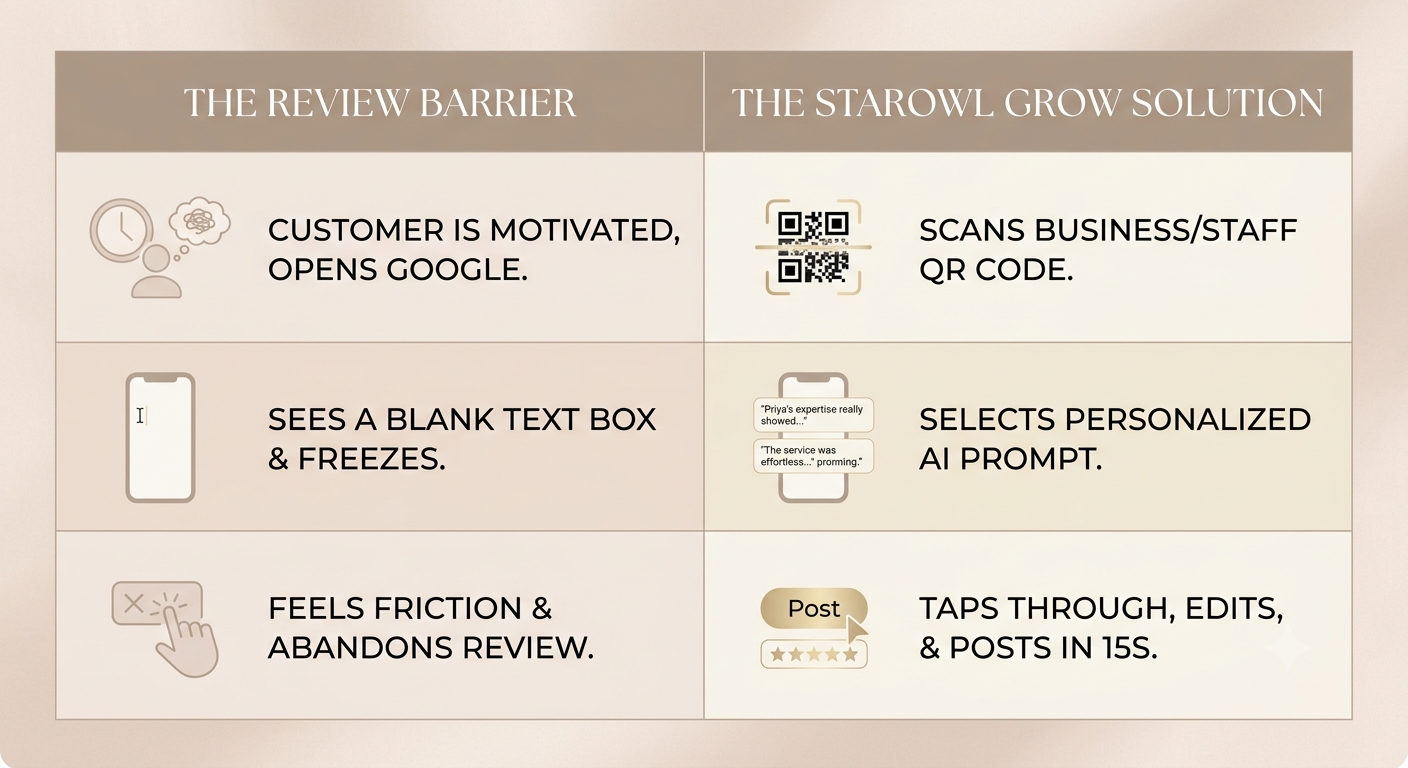
StarOwl Grow is built to remove that specific friction - not by posting reviews on behalf of customers, but by giving customers a starting point they can personalise and post in their own words.
How the Grow Feature Works
From your Nextel dashboard under Reviews → Grow, you generate AI-powered review prompts for your specific business. The prompts are created based on your business name, category, and key highlights you specify - things that make your business distinctively good.
These prompts are displayed on a clean, mobile-friendly page at a unique URL linked to your business QR code. When a customer scans the QR, they see two or three prompt options — a short version and a more detailed version - that capture the kind of experience your customers typically have.
The customer reads the prompts, picks one that resonates with their actual experience, taps through to Google, edits it in their own words if they want, and posts. Their review. Their words. Their authentic experience - with the blank-page problem removed.
The whole process takes approximately 15 seconds from scan to Google review page.
Business QR and Staff QRs
Every business on the StarOwl Grow feature gets a Business QR code - a single code that can be placed anywhere customers interact with your business.
Common placements:
• Printed and framed at the counter or checkout
• On table tents in restaurants
• Included in WhatsApp follow-up messages after a visit
• On receipts, packaging, or takeaway bags
• On a sign near the exit
The Business QR is available as a PNG for digital use and as a print-ready PDF for physical placement.
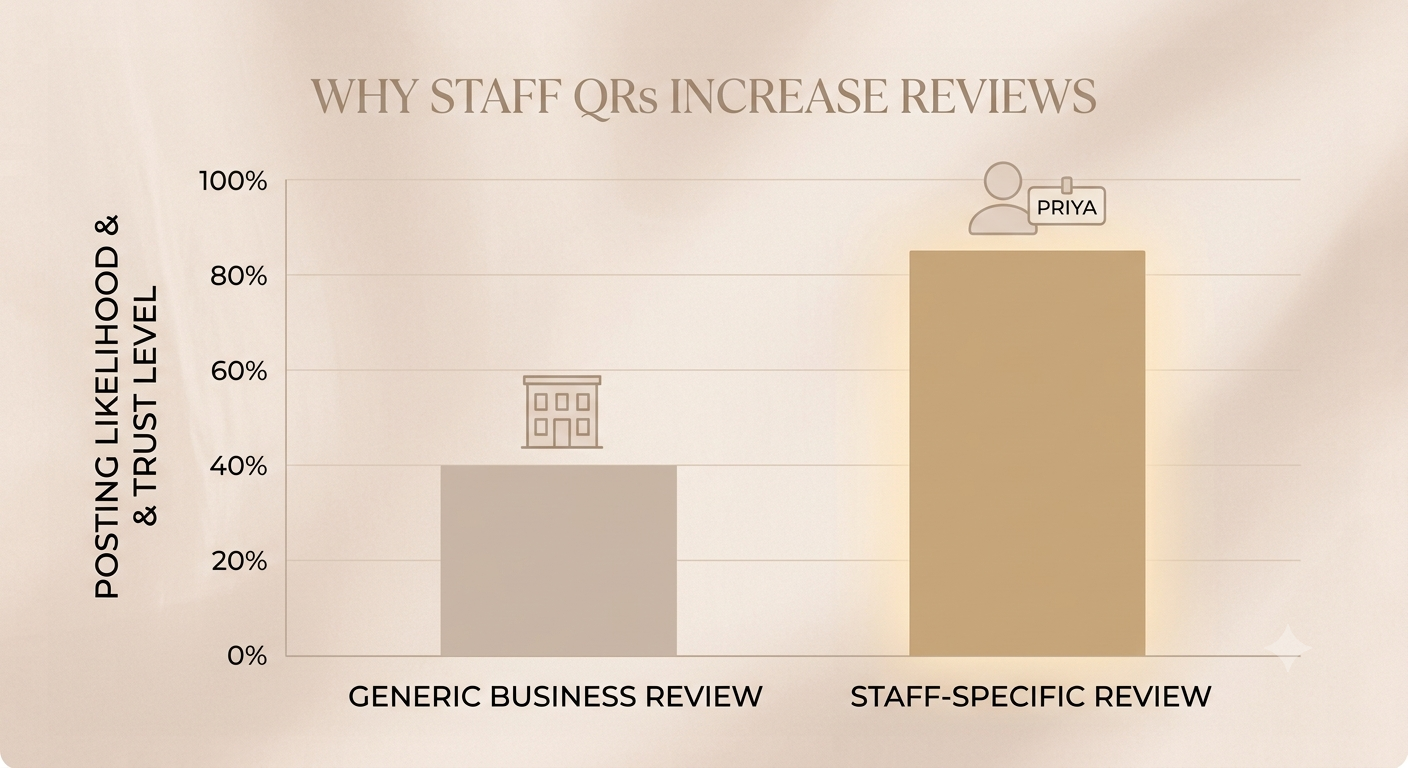
StarOwl Grow's Growth tier also includes Staff QRs - individual QR codes for each member of your team.
When a customer scans a specific staff member's QR, the review prompts on that page naturally include that staff member's name. A customer who scans Priya's QR sees prompts like: 'Priya made the whole experience feel effortless' or 'Priya's expertise really showed - I felt completely taken care of.'
Why this matters: reviews that mention a specific staff member by name are more personal, more trusted by readers, and - critically - more likely to be posted by the customer because they feel specific rather than generic. A customer who had a great experience with Priya specifically has a much easier time posting a review that says so.
How the AI Prompts Are Generated
When you set up the Grow feature for a business, you provide a few highlights - what the business is particularly known for, what customers most frequently compliment. The AI uses this to generate prompts that sound like something a real customer of that specific business would say.
Importantly, the prompts are:
• Specific to the business - not generic 'great service' phrases
• Written in natural customer language - not marketing copy
• Rotated in regular intervals - so customers who visit multiple times see fresh options, and Google sees natural review diversity rather than identical posts
The rotation is built in deliberately. Identical reviews from multiple customers would be a red flag for Google's spam detection. The prompt variety - combined with customers personalising in their own words — ensures that reviews posted through StarOwl Grow are genuinely diverse.
Where to Find It
The Grow feature is accessible in your Nextel dashboard under Reviews → Grow.
From the Grow page you can:
1. Connect your Google Business Profile (if not already done under Settings)
2. Select your location and add your business highlights
3. Generate your review prompts - these are previewed before going live
4. Download your Business QR in PNG or print-ready PDF format
5. Add staff members and download individual Staff QRs (Growth tier)
6. View QR scan counts to see which codes are being used most
StarOwl Pricing
The Grow feature is part of the StarOwl add-on, available on any Nextel plan:
• Essential tier: includes auto-reply to reviews, negative review alerts, and review analytics
• Growth tier: adds the QR review funnel (Business QR + Staff QRs) and staff-level personalisation
Both tiers are priced per location — so businesses with multiple branches can add locations as they grow.
Set up StarOwl Grow in your Nextel dashboard, or start free at nextel.io.